 FolderAtlas
Export and print
Click Export… in the toolbar (⇧⌘E), choose a format and how deep to go, then click Export…. To get a PDF, click Print / Save as PDF… instead.
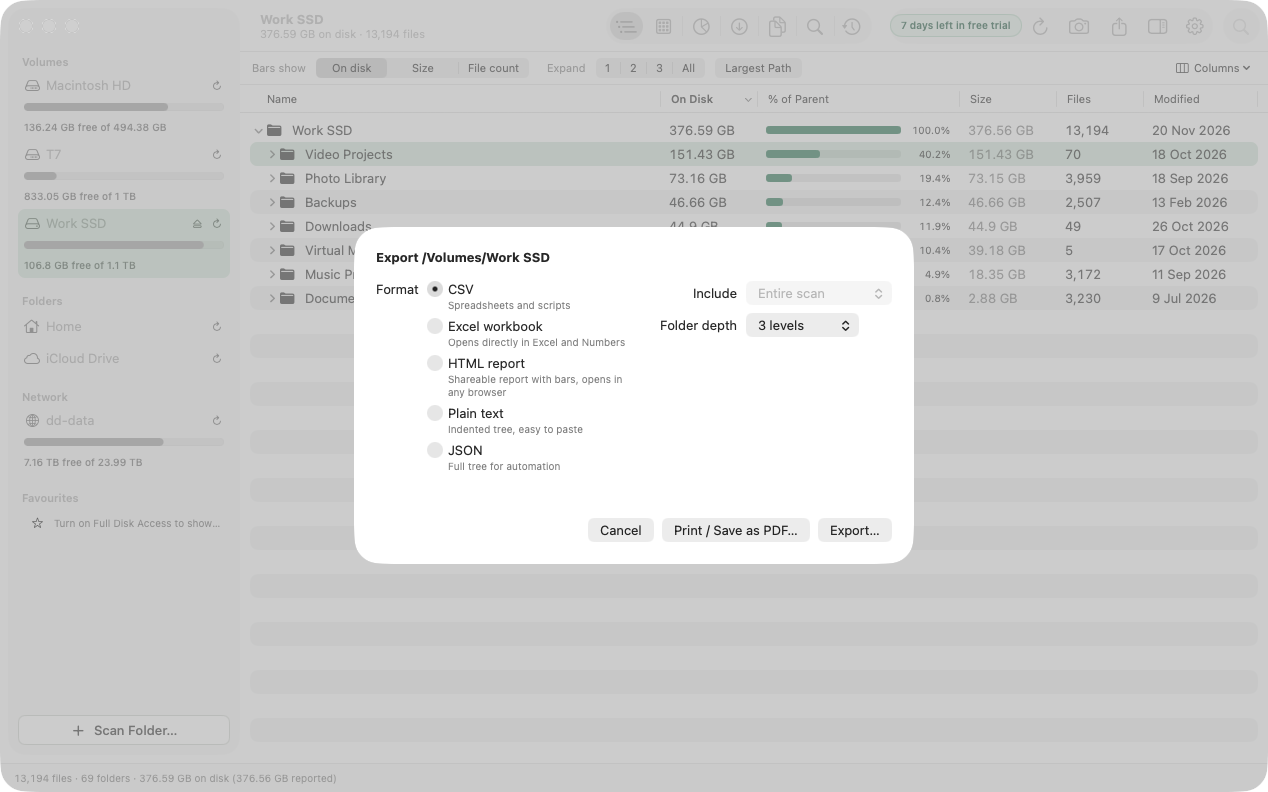
Formats
| Format | Best for | Contains |
|---|---|---|
| CSV | Spreadsheets and scripts | Path, name, type, size and on-disk size in bytes, files, folders, % of parent, modified date. |
| Excel workbook (.xlsx) | Excel and Numbers | The same columns as CSV, as numbers you can sort and total. |
| HTML report | Sharing with someone | A page with name, on-disk size, a % of parent bar, files and modified date. Opens in any browser. |
| Plain text | Pasting into a message | An indented tree with a size and percentage on each line. |
| JSON | Automation | The full tree as nested objects. |
Options
- Include: the entire scan, or just the folder you are focused on.
- Folder depth: 1, 2 or 3 levels (3 is the default), or Everything. Exporting everything can produce a very large file for a whole disk.
The file is named after the location and the date, and is revealed in Finder when it is ready.
Print or save as PDF
Click Print / Save as PDF… in the export sheet. FolderAtlas lays out the HTML report and opens the standard macOS print window, where the PDF menu saves it as a PDF.
Export a list of files
In Largest Files or Search, select files and choose Actions › Export List… to export just those files.
Reports on a schedule
A scheduled scan can save a PDF, CSV, Excel or HTML report to Documents/Disk Reports each time it runs.
Last updated: 20 November 2026