 FolderAtlas
Reading the treemap
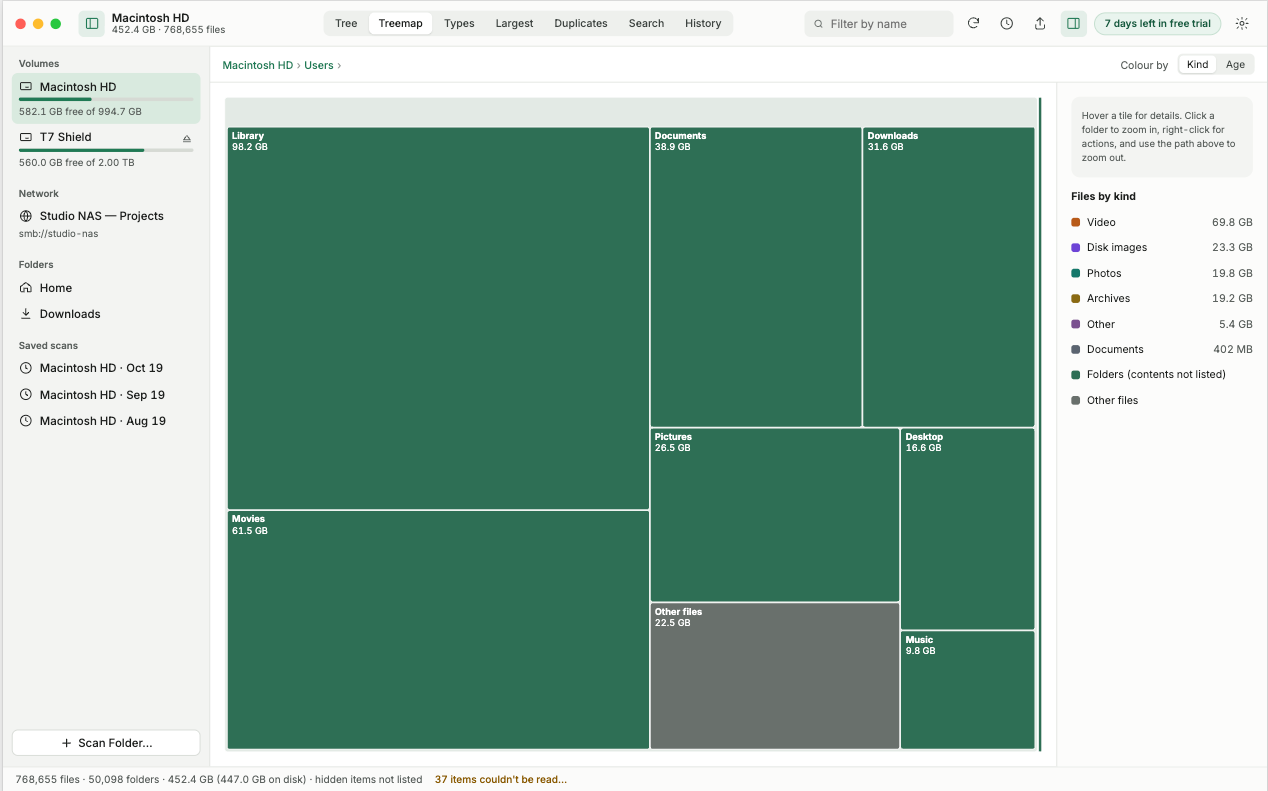
In the treemap, each rectangle is a folder or file and its area is proportional to its size. The biggest rectangles are using the most space. Click one to zoom in.
What you are looking at
The whole view represents the location shown in the path bar at the top. It is divided among the items inside that location, each drawn as a rectangle sized by the space it uses and labelled with its name and size. An item twice as large covers twice the area.
Moving around
- Zoom in: click a folder's tile. The treemap redraws to show only that folder's contents.
- Zoom out: click any earlier step in the path bar.
- Details: point at a tile to see its details.
Colours
Tiles are coloured by kind of file, and the key beside the treemap names each colour and its total. Colour is never the only signal: every tile carries a text label too.
When to use the treemap
Use it first, to see the shape of the problem. One enormous tile means one folder to investigate. Many similar tiles mean the space is spread out, and the largest files list or the file types view will be quicker. For exact numbers and sorting, switch to the folder tree.
Last updated: 19 November 2026